Queen
The most important bee in the hive — QueenRadar marks her with a gold box and an optional sound when spotted.
QueenRadar turns your phone camera into a comb scanner. It analyzes the live image right on the device — no internet, no photos leaving your phone. For now it detects the queen and queen cells; more classes on the way.
✓ Free on Google Play
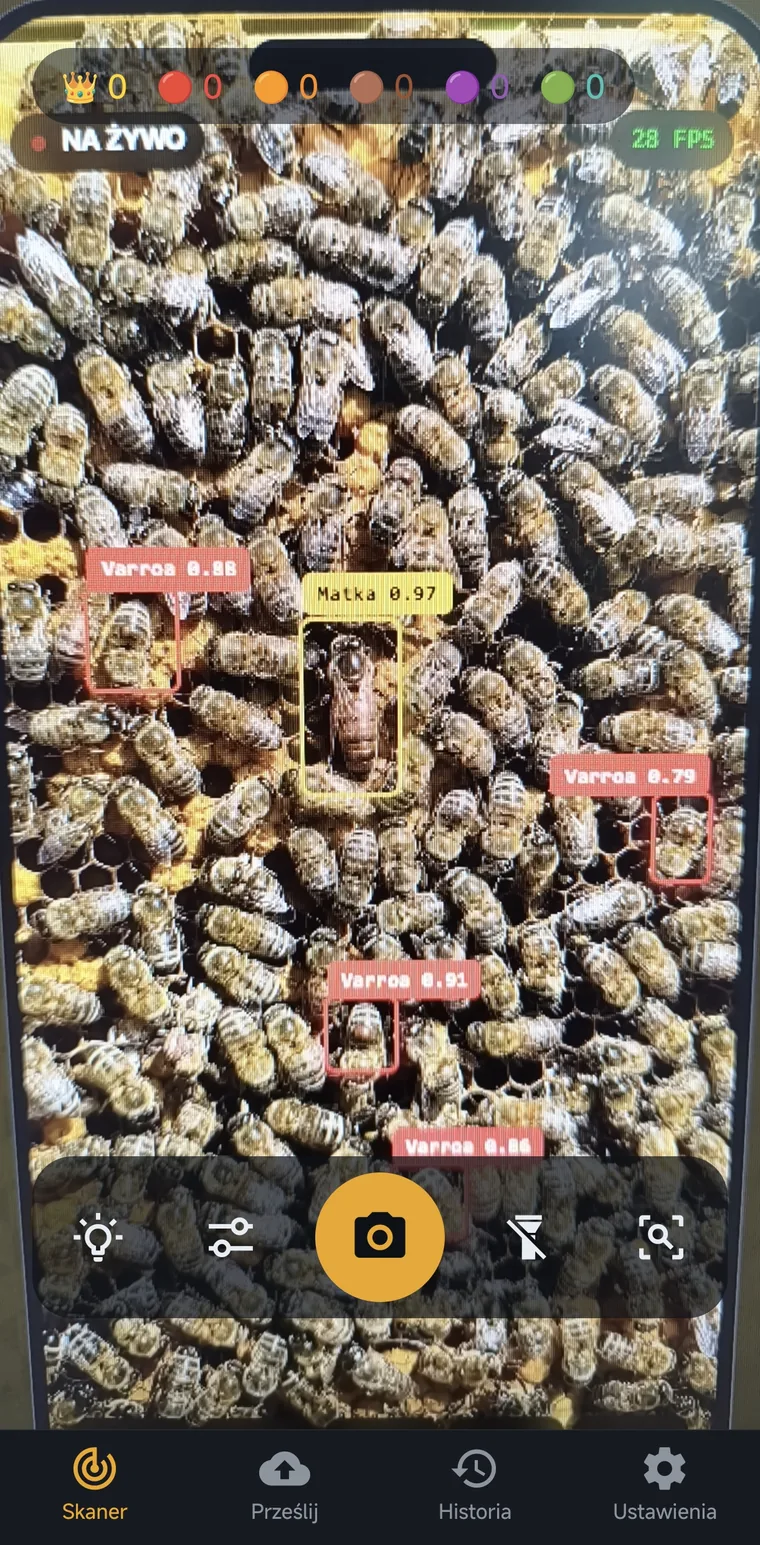
Point your phone at the comb. A model trained on bee imagery highlights the queen and queen cells in real time — before you even put the frame down. Faster, calmer, repeatable.
For now the app detects the queen and queen cells. Detection of Varroa, brood and DWV is in preparation.
The most important bee in the hive — QueenRadar marks her with a gold box and an optional sound when spotted.
Queen cells on the comb — a sign of swarming or supersedure. Catch them before the colony swarms.
Varroa destructor mites on bees and brood. Early detection is key to effective treatment.
Cells with abnormal or diseased brood — a sign of colony health problems.
Bees with Deformed Wing Virus — a common symptom of heavy Varroa infestation.
Got a photo from the apiary? Find the queen in a photo online, count varroa mite drop from a board photo or read how to find the queen bee.
Open the scanner and bring the phone close to the comb. Focus — the model starts analyzing the image instantly.
Boxes and counters appear in real time. Adjust the confidence threshold globally or per class.
Capture a photo with detections drawn on it and review the session history.
The camera image never leaves your phone. No cloud, no accounts, no tracking.
Detected objects drawn onto the camera image in real time.
The current count of each detected class on a single screen.
Tune detection sensitivity globally or separately for each detected class.
Save frames with detections for later analysis.
Review past scans, duration and detection counts.
Full interface in English and Polish, switchable in settings.
Zoom in on the queen and read the number on her marking disc — without putting the frame down.
Offline on-device analysis — photos never leave your phone.
The more varied comb photos and videos the model sees, the more accurately it detects the queen and queen cells — and the sooner more classes arrive: Varroa, damaged brood and DWV. If you want to help, submit your own material — it is entirely voluntary and needs no account.
Yes. Detection runs entirely on your phone (on-device) using our AI model. No internet connection is needed to analyze the comb, and the camera image never leaves your device.
Currently the app detects the queen bee and queen cells — each with its own bounding-box color and counter on the live preview. Detection of Varroa mites, damaged brood and DWV is in preparation.
Comb analysis is local and offline — the camera image never leaves the phone. The app may send an anonymous crash report (no photos) only with your consent. Data (photos/videos) reaches us only when you deliberately submit it through the “Help improve QueenRadar” form, after giving consent.
Devices running Android 8.0 (API 26) or newer. Detection smoothness depends on your phone’s power — newer models reach a higher frame rate.
We use submitted photos and videos solely to train and improve the QueenRadar detection model. We store them in a secured directory, never share them with third parties, and you can withdraw consent anytime on the withdraw consent page — enter your submission ID and we delete the files from our server.
The app is free on Google Play — no ads, no account and no subscription. Queen bee and queen-cell detection, saving photos with detections and session history are all free.
No. The app works without creating an account. Submitting material for model training also requires no registration.
Download the app and see how quickly you can find the queen and assess colony health — offline, on your own phone.